Progress bars that don't lie
A spinner is a shrug with animation. How I designed meetre's processing UI around honesty: five named steps in five colors, bars that never go backwards, results that show up before the work is finished, and errors you can actually fix.
A spinner tells you exactly one thing: something might be happening. It spins the same whether the app is two seconds from done or stuck in an infinite loop since Tuesday. It's a shrug with animation, and I've stopped using them anywhere the work takes longer than a breath.
meetre is a good place to be strict about this, because it does genuinely slow work. You stop recording, and the app has to transcribe the audio, figure out who said what, write a summary and save everything. On a 30-minute meeting that used to take a few minutes. Minutes are long when you're staring at a menu bar. So the processing UI got more design attention than almost anything else in the app.
Name the steps
The pipeline has five steps and the popover shows all of them as a checklist: Preparing, Transcribing, Speakers, Summary, Saving. Done steps get a check in the step's color. The active one pulses gently, with a thin progress bar and a detail line under it. Pending steps sit dimmed below.
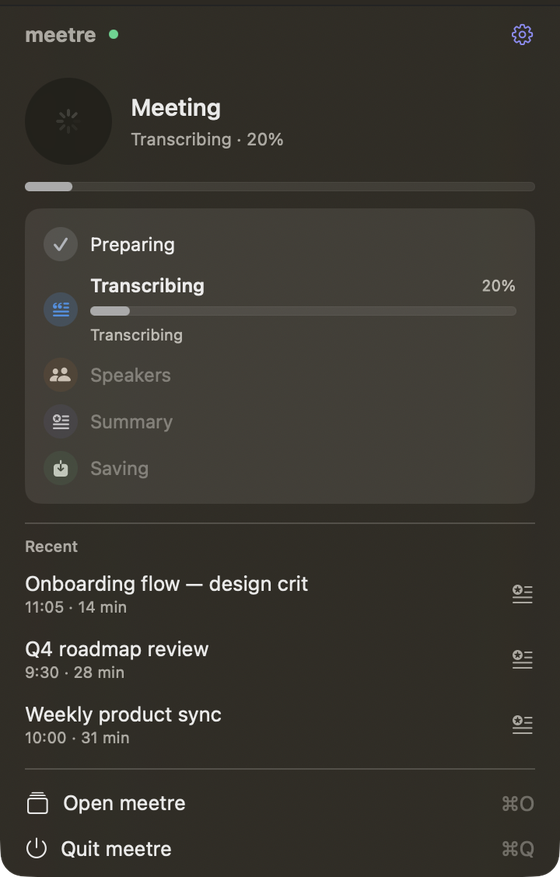
Each step has its own color token. Preparing is grey, Transcribing is blue, Speakers is orange, Summary is the indigo accent, Saving is the same green as "live". The menu bar icon takes on the color of the current step, so a glance across the room tells you roughly where things are without opening anything.
Naming the steps does something a single progress bar can't. It explains why it's slow. "Transcribing" is obviously work. "Speakers" makes you think, oh right, it has to figure out who's talking. People are far more patient with a process they understand, even if the total time is identical.
A spinner asks you to trust it. A named step tells you why you should.
Never go backwards
The design book has a short rule for the pipeline: never go backwards. A step that's checked stays checked. A bar that reached 60% doesn't jump back to 40% because the next phase restarted its own counter.
Sounds obvious. It isn't. Plenty of installers run five sub-tasks and give each one a fresh 0 to 100, so the bar fills, empties, fills, empties. Each reset reads as "something went wrong, starting over". I'd rather show a separate bar per step and let the step list carry the overall progress.
The other rule: determinate whenever possible. Progress bars in meetre are thin, 4 pt, rounded, and they show an actual percentage when the engine can know one. Transcription can, so you get "Transcribing · 42%". Speaker detection can't really estimate itself, so it says "Detecting speakers…" and the step pulse does the rest. What it never does is fake a number.
Feedback in 100 ms, results in seconds
One of meetre's six principles is "feels instant": every interaction answers within 100 ms, even when the work takes minutes. Click stop, and the button changes immediately, the status line switches to "Preparing", the first step lights up. The real work hasn't started yet. You don't care. You know you were heard.
The bigger fix was structural. meetre used to wait until everything was done and then deliver the finished file. Now it publishes progressively. The transcript gets written (as Markdown and into Apple Notes) right after transcription. Then it's updated in place once speakers are identified, and again when the summary and title are ready.
So the honest answer to "how long until I can read it?" went from "a few minutes" to "almost immediately, and it gets better while you read". Moving speaker detection onto the Mac's GPU helped too: ten minutes of audio went from about 275 seconds on the CPU to around 23 on an M5 Pro. But the progressive publish is what changed how it feels. The fastest progress bar is one you don't need to watch.
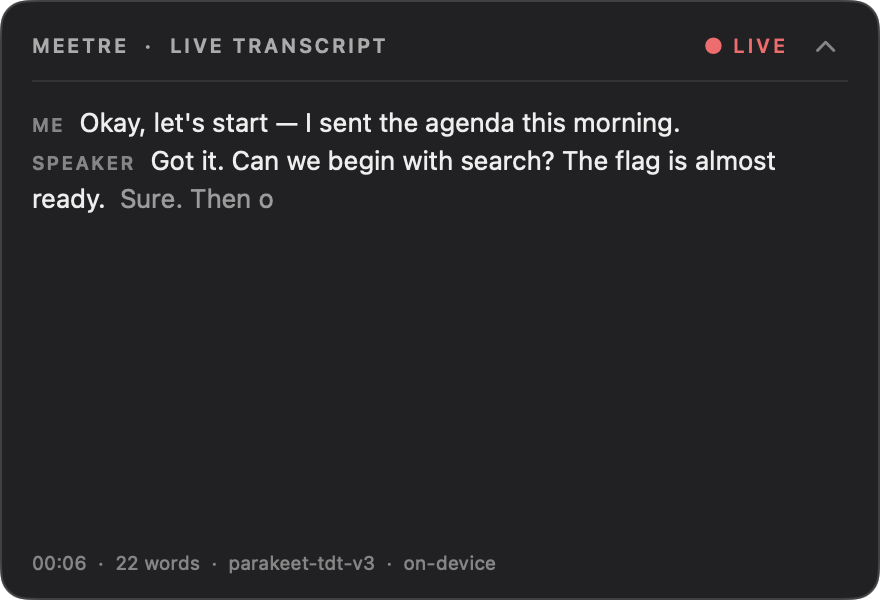
The live transcript overlay pushes the same idea further. While you're still recording, captions float in a small click-through panel in the top-right corner. Collapsed it's just a slim header strip. The footer shows the elapsed time, the word count, which model is running and the words "on-device". Nothing to wait for, because it's already there.

Color is never the only signal
Every state in meetre pairs color with a symbol or a word. "● Recording", "✓ Done", "⚠ Needs permission". The menu bar doesn't just turn green when processing finishes, it shows a green check and the word "Done" for five seconds. A failed run gets an amber triangle that stays until you open the popover.
This one is partly accessibility (plenty of people can't tell orange from green at 16 px) and partly plain honesty. Color is a hint. A word is a statement.
Errors you can fix
The last piece is what happens when it goes wrong, because it will. Errors in meetre are an inline banner at the top of the affected view: a warning symbol, one sentence, one button that fixes it. A missing permission gets a ⚠, a sentence saying which one, and the button that gets you there. Alerts are only for confirming something destructive, like deleting a meeting.
Every error banner also has a "Copy log" button. It copies versions, settings and the relevant error lines, never transcripts or summaries, so you can paste it into a GitHub issue without accidentally sharing your meeting. That's honesty pointing the other way: the app tells me what went wrong, too.
TaskAlarm, my little to-do app, follows the same instinct in a friendlier voice. A missed task doesn't say "You failed to complete…". It turns red, shakes once, and asks: "Missed, want to do it now or later?" Same information. Much less shame.
I used to think progress UI was the boring part of an app. Turns out it's the part people stare at the longest.