TaskAlarm, the to-do list that cheers you on
I built a tiny macOS menu bar app that reminds me of things like a friend would. A smiley that changes color, reminders you can type in plain English or German, warm synthesized sounds, and no network at all.
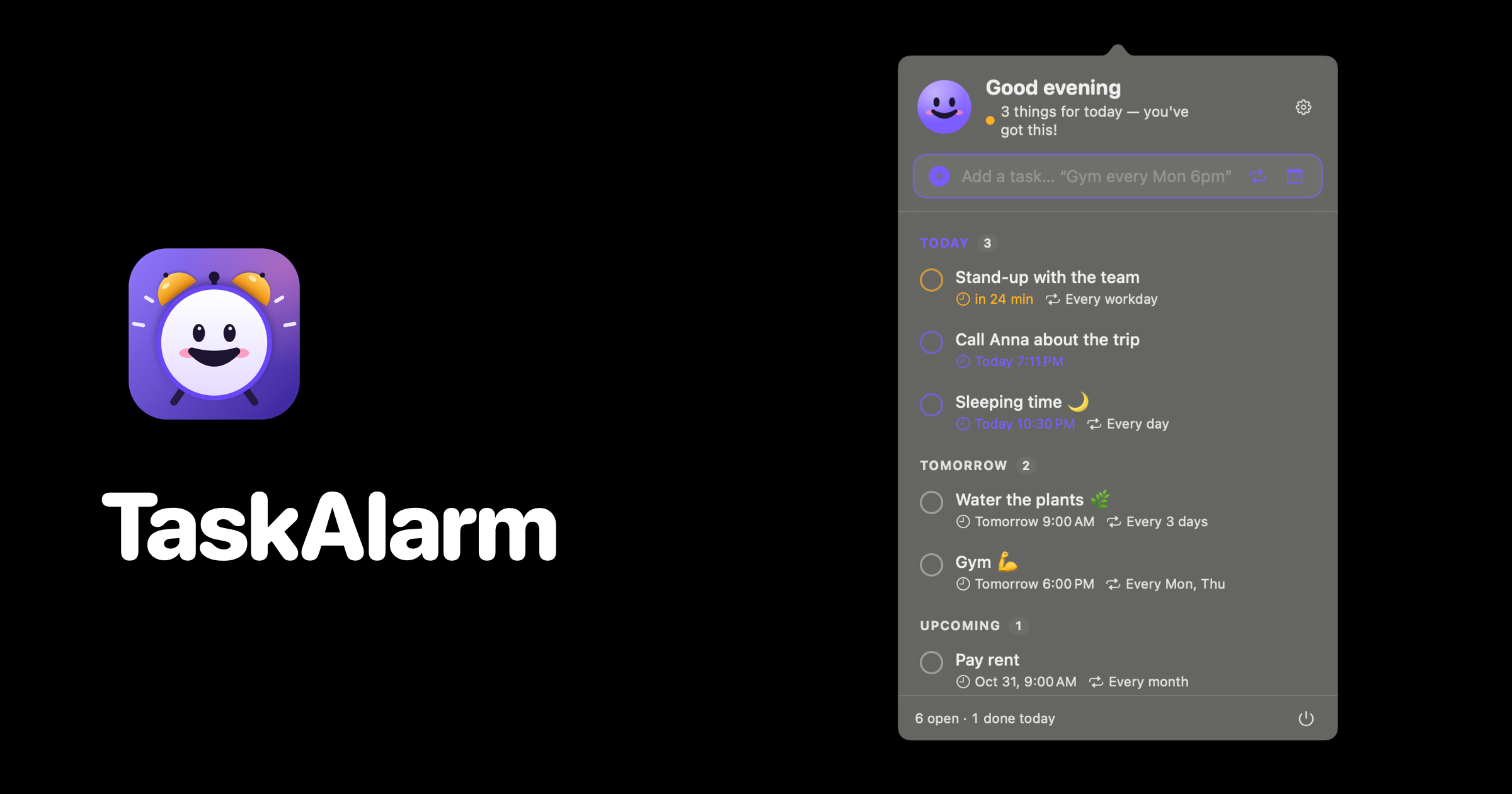
There's a notification on my screen right now that I have dismissed eleven times. I know it's eleven because the app proudly tells me. That's the whole problem with reminders in one sentence: they're either so quiet you swipe them away without reading, or so loud and guilt-flavoured that you start resenting the thing that's supposed to help you.
So I built TaskAlarm. It's a small to-do list that lives in the macOS menu bar, and its whole personality fits in the tagline: the to-do list that cheers you on.
A smiley instead of a badge
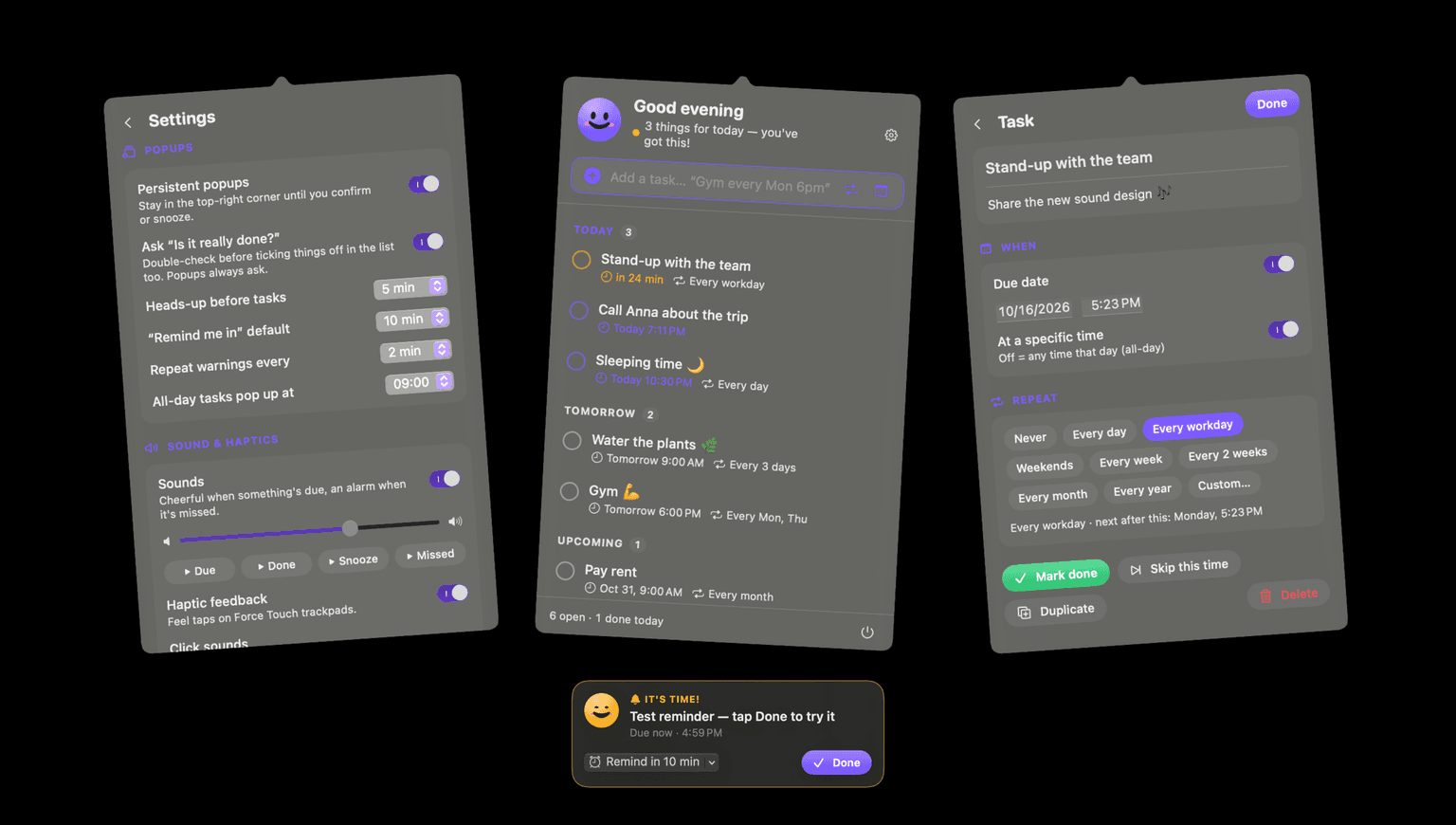
The menu bar icon is a face. Its color is the status: green when everything's clear, amber when something's due, red when you missed something. Its expression does the rest. It's happy when you're relaxed, eager when you have things to do today, excited when something is due right now, and it grins when you tick the last thing off.
It only looks worried when something actually got missed. That's a rule, not a coincidence, and it's the reason the app works for me. A red number in a badge says "you are behind." A face that's mostly smiling says "you've got this," and the one time it isn't, you notice.
In the app icon the smiley is an alarm clock, with two amber bells, a little hammer and tiny feet. In the menu bar it's only the face, because at 16 pixels you get eyes, a mouth and some blush, and that's about it.
Type it like you'd say it
The add field reads plain language. Call Anna tomorrow 3pm becomes "Call Anna", tomorrow at 15:00. Gym every Mon and Thu 6pm repeats twice a week. Pay rent every month, Review every 3 days, Meeting in 2 hours all do what they say.
German works too, because most of my life happens in German: Zahnarzt morgen um 10 Uhr or Sport jeden Montag 18 Uhr. The parser handles "jeden Werktag", "alle 3 Wochen", "täglich" and friends with its own patterns, and leaves the actual dates to the system's date detector, which already speaks a lot of languages.
My favourite small rule in there: words like "daily" or "weekly" only count as repetition when they're not the first word. So a task called Daily every workday 8:30am keeps its name "Daily" (that's my stand-up) and repeats Monday to Friday. I found that bug the first morning I used it, which is the only kind of user research I can afford.
If typing isn't your thing, there are repeat and calendar buttons next to the field, and clicking a task opens a page with notes, date, time and repeat presets, plus custom rules like every N days, weeks, months or years, or specific weekdays.
Three stages, getting louder
A reminder in TaskAlarm is a little story with three acts.
First, an optional heads-up, five minutes before by default. A soft "Coming up" card, nothing more.
Then the moment itself. A warm chime, and a card slides in from the top-right corner that says "It's time!". With persistent popups switched on, that card stays until you press Done or pick "Remind in…" for somewhere between 5 and 30 minutes.
Then, if you ignore it, the third act. A timed task counts as missed only after a five-minute grace period, because "due at 3" and "it's 3:01" shouldn't feel like failure. After that the card turns red, plays a soft ding-dong alarm, shakes once, and repeats every few minutes until you deal with it.
A reminder should feel like a friend tapping your shoulder, not a boss reading your timesheet out loud.
"Is it really done?"
When you press Done, TaskAlarm can ask one more question: "Is it really done?" It sounds silly. It is the most useful feature in the app.
My worst habit with to-do lists was ticking things off to make the reminder go away. The task wasn't done, I just wanted the noise to stop. One extra tap is enough friction to make me be honest with myself, and the smiley switches to its celebrating face while it waits, which makes the honest answer feel rewarding instead of annoying. Popups always ask; for ticking things off in the list it's a toggle in settings.
Nothing leaves your Mac
Tasks are stored in a single JSON file in ~/Library/Application Support/TaskAlarm/tasks.json. There's no account, no sync service and no network code at all. If the file ever gets corrupted, the app moves it aside as a timestamped backup instead of silently starting over. Uninstalling is deleting the app and that folder.
All the sounds are synthesized at runtime too, so there aren't even audio files in the bundle. That deserves its own post, and it's getting one.
Getting it
It's one line in Terminal:
curl -fsSL https://raw.githubusercontent.com/maxlkatze/taskalarm/main/install.sh | bash
That downloads the latest release into /Applications and launches it. Look for the smiley in your menu bar. If you'd rather build it yourself, it's a Swift package that needs macOS 14 and the Xcode command line tools, and ./scripts/build.sh --install does the rest.
It's open source under MIT. I built it because my old reminder app made me feel bad about myself about four times a day, and the new one hasn't managed that once yet.